



[aux_dropcap style=”classic”]A[/aux_dropcap] lot of companies are moving their businesses to the cloud to do application or infrastructure deployment. For an organization, it is critical to understand the advantages and differences between the various cloud services so that they can opt for the one that suits their needs best.
In this article, you will learn about the 3 major types of cloud computing services: IaaS, PaaS, and SaaS.
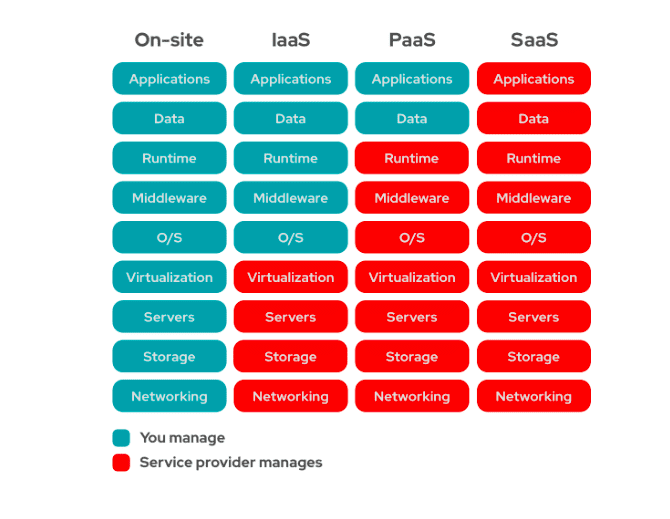
Before mapping or moving your business to the cloud, you need to first decide how much of the services you wish to manage and how much you want the service provider to manage.
To do this, let us compare and analyze who manages what in Infrastructure as a Service (Iaas), Software as a Service (SaaS), and Platform as a Service (PaaS).

Software as a Service (SaaS), also known as cloud application services is the most commonly utilized option chosen by businesses in the cloud market. SaaS is a software distribution model in which a cloud service provider hosts applications at their end and makes the resources available to customers over the internet. Most of the SaaS applications run directly through a web browser; the end-users do not require any downloads or installations on the client-side.
The web delivery model of SaaS eliminates the need to have IT staff download and install applications on each individual computer. With SaaS, vendors or customers can manage all potential technical issues, such as data, servers, storage, and middleware themselves. This model helps companies to streamline maintenance and support for their business.
SaaS helps companies by greatly reducing the amount of time and money spent on tedious tasks such as installing, managing, and upgrading software. Thanks to SaaS, technical staff can now spend their time resolving more critical issues within their organization.
SaaS is recommended in the following situations:
Cloud platform services, also known as Platform as a Service (PaaS), is a cloud computing model where a third-party vendor delivers hardware and software tools to end-users over the internet.
PaaS provides a framework for developers that they can build upon and utilize to create customized applications. A third-party provider or an enterprise manages all servers, storage, and networking while the developers maintain management of the applications.
In terms of delivery model, PaaS is similar to SaaS. However, instead of delivering software services over the internet, PaaS provides a platform for software creation. This platform is delivered through the internet. Provides developers with the freedom to focus on building the software without having to worry about the operating system, software updates, storage, or infrastructure.
PaaS enables businesses to design and develop applications that are built into the model with special software components. These applications, sometimes referred to as middleware, are scalable and highly available as they exhibit certain cloud characteristics.
Examples of PaaS include AWS Elastic Beanstalk, Force.com, Google App Engine, and OpenShift.
Paas offers multiple benefits to organizations of all sizes.
A few benefits are listed below:
Organizations can benefit by utilizing PaaS in several situations. For example, companies can use PaaS to:
PaaS implementation can also greatly reduce costs and simplify a few challenges that come up if a company is rapidly developing or deploying an app.
Infrastructure as a Service (IaaS) is a type of cloud computing service that offers essential compute, storage, and networking resources on-demand, on a pay-as-you-go basis.
IaaS allows organizations to purchase resources on demand and gives them the flexibility to scale them up or down based on their need.
By migrating their infrastructure to an IaaS solution, a business can reduce maintenance of on-premises data centers, reduce spending on hardware costs and gain real-time business insights.
IaaS delivers cloud computing infrastructure, such as servers, networks, operating systems, and storage, through virtualization technology. Through the IaaS model, an organization is provided with cloud servers typically through a dashboard or an API. This model provides clients complete control over their entire infrastructure. IaaS provides the same technologies and capabilities as a traditional data center without having to physically manage all of it.
When compared to SaaS or PaaS, IaaS clients are responsible for managing aspects such as applications, runtime, OSes, middleware, and data. However, the IaaS provider manages the servers, hard drives, networking, virtualization, and storage. A few providers even offer more services beyond the virtualization layer, such as databases or message queues.
A few examples of IaaS include:
IaaS offers benefits, including:
IaaS is beneficial in the following scenarios:

While each cloud model offers a specific set of features and functionalities, your organization needs to understand the differences and choose the cloud model that fits your needs best.
Your needs may vary from purchasing cloud-based software for storage options, opting for a smooth platform that allows you to create customized applications, or having complete control over your entire infrastructure without having to physically maintain it.
Hence, ensure you compare the cloud service models and select the one that fulfills most/all of your needs.
[aux_dropcap style=”classic”]W[/aux_dropcap]ith the growing size and complexity of data centers, admins require a robust way to manage their infrastructure. Infrastructure as code is a powerful solution that treats your infrastructure as code and automates manual tasks on any platform.

In this article, we’ll explain exactly what infrastructure as code is, how it works, how you can use it at work, what famous tools available in the market, and also some of the benefits that it can offer your business. So whether you’re new to the concept or have been using it for a while, make sure to read on to learn more about this powerful tool!
Infrastructure as Code (IaC) is a software development practice that automates the management, configuration and deployment of infrastructure components. In a typical industrial environment, you might have separate systems for hosting servers, deploying applications, and managing user data. With IaC, all these tasks can be automated using code to simplify management and keep track of changes.
With IaC, you can centralize your deployments by automating the entire process from start to finish. This includes configuring servers, installing apps, managing updates, setting up security policies, and more. Furthermore, using IaC makes it easy to scale your infrastructure without having to worry about IT complexity or investments in additional resources. Additionally, if you need assistance with deploying or managing an app on the cloud, Jeevisoft DevOps or Cloud Engineer will be able to help you out ASAP!
In order to get started with IaC at work, there are a few infrastructures set up that you will need:
The first step is to create a repository or also known as a repo in a short form where you can store all the source code associated with your infrastructure as code. This could be Visual Studio Code software or something more simple like a text file to store the source code.
Now you have created your repo or repository, you need to configure IaC software in order to automatize the management and deployment of your infrastructure components. There are many different tools or frameworks available for doing this. However, we would like to mention some of the most popular tools such as Vagrant, Ansible, Terraform, Cloudformation, etc.
Once you have configured IaC, the next step is to create a pipeline. A pipeline is a set of commands that are used to automate the management and deployment of your infrastructure components. This can be done using a variety of compiler options, versions, and platforms. The build pipeline also usually includes scripts or recipes that configure the build environment variables accordingly.
Now you have built the pipeline, the next step is to use it to deploy your code. There are many different ways that you can deploy your code using a pipeline. The most famous method is to use Jenkins software to deploy the code.
There are a number of different tools that you can use to help automate the management and deployment of your infrastructure components. Some of the most popular infrastructure as code tools include:
The following key benefits of IaC include:
Simplification of management by automating the deployment of new code or changes to existing code, IaC can help reduce workloads and simplify day-to-day tasks.
IaC can help improve the reliability and consistency of infrastructure by automating the deployment of new code or changes to existing code. This can help reduce manpower requirements, while also ensuring that your infrastructure is updated in a repeatable way.
By automating the management and deployment of infrastructure components, we reduce the complexity and risk associated with these tasks. This can help to maintain consistency in the infrastructure place as well as reductions in downtime.
We can rapidly deploy new code or changes to existing code without having to worry about managing this process manually. This leads to faster turnaround times for delivering the infrastructure.
In this article, you have learned all about Infrastructure as Code (IaC) and What is it, how it works, and how can you use it. Now it is time for you to try out these tools and see how you can improve your Infrastructure in IaC workflow. If you want to learn more about these tools and technology or looking to implement this solution in your company. We are always here for you. Please contact us for a free consultation.


These top 5 AI tools allow you to automate marketing tasks, such as email marketing, social media posting, Chat Bot, Gender analysis, and copywriting so that you can focus on what’s really important – creating great content and driving traffic from your website.
Before going to discuss the Artificial Intelligence tools, let’s first understand the problem of following a traditional marketing strategy.

Traditional marketing strategy focuses on creating ads, sending out emails, and trying to get people to visit your website. While these methods are effective in some cases, they are not always the best way to reach your target audience.
Another problem with a traditional marketing strategy is that it relies on large companies or agencies to spend a lot of money creating and distributing marketing content in order to reach an audience.
However, this Model is not always sustainable for small or medium-sized businesses that may not have the resources to do this themselves. As a result, small or medium businesses are demanding AI-powered marketing tactics that can help them connect with their desired consumers more effectively.
There are many reasons why artificial intelligence can be used in digital marketing, including the ability to automate certain tasks that would otherwise be time-consuming or complex, targeting specific and relevant audiences with more precision than ever before, and providing greater insights into how customers interact with your brand.
Additionally, AI can help improve customer experience by automating processes such as feedback collection and engagement analysis. Ultimately, using AI in digital marketing helps you achieve breakthrough results faster than ever before while reducing costs associated with traditional marketing techniques.
Digital marketing is an increasingly complex and challenging task, which is why AI tools are so valuable. AI tools can automate many of the tasks involved in digital marketing, saving time and resources. This means that you can focus on more important things, like strategy and execution.
Additionally, AI can identify your audience and target them with precision- making your marketing efforts more efficient and successful overall. Finally, AI tools can help you create custom content, which is essential for effective online campaigns.
The Best AI tools can help you automate marketing tasks, make data-driven decisions, and even create custom marketing campaigns. Before making a purchase, it’s important to understand the different types of AI tools for Digital Marketing and their purposes.
Once you have a better idea of what you need the AI tools for Digital Marketing, it’s time to compare the features and pricing of several different AI tools. From there, it’s easy to decide on the best one for your Digital Marketing Business.
So why not give one of these AI tools a try and see how it can help your marketing strategy become more effective and efficient?
Digital marketing is a never-ending cycle of strategies and techniques that need to be constantly tweaked in order to reach the right audience and achieve your marketing goals. Fortunately, AI Email Automation tools can take care of all the hard work for you! This means that you can focus on other parts of your marketing strategy, like content marketing or social media marketing.
At its core, email automation is all about taking the hassle out of sending emails. You can set up your tool to send multiple emails automatically based on certain triggers or conditions, meaning that you don’t have to spend time inputting each and every one of these details manually.
Additionally, AI Email Automation tools offer a number of other features that can make your email campaigns more effective, such as personalized content or dynamic lead gen forms.
Moreover, with AI-generated email sequences, you can increase engagement rates among your subscribers. These AI-generated email sequences could cover topics such as career advice or product recommendations.
A chatbot is a type of AI that interacts with humans on social media platforms like Facebook Messenger, and WhatsApp. Chatbots are designed to provide quick, simple answers to common questions.
For example, you might ask your chatbot for the weather forecast for tomorrow or what the best time to buy shoes online is.
One of the key benefits of using a chatbot over traditional email marketing is that it can be more engaging. Not only will your customers find it easier to contact you through messaging services, but they will also likely enjoy interacting with a live human being rather.
Digital marketing is a powerful tool for creating gender diversity in the workplace. By using digital tools and strategies, you can create more opportunities for women to be heard and contribute their unique perspectives to business decisions.
There are a number of ways that you can use AI Gender Analysis Tools to help promote gender diversity in your business:
For example, you can use machine learning algorithms to detect the phrases or words that are more commonly used by men or women in your target market. From there, you could produce content that addresses these issues in a gender-sensitive way.
For example, you could use an AI tool to analyze executives’ resumes or surveys to gauge the level of gender diversity in your company.
For example, Facebook has an advertising product called “Women’s News Feed Ads” that allows businesses to run ads targeting women based on their interests (such as fashion brands or health products). This way you can reach female consumers who may not have been reached by other forms of advertising.
AI Social Media Posting can help you create social media posts that are more engaging and relevant to your target audience.
For example, AI could be used to identify the tone of a particular post (positive, negative, encouraging) and adjust the content accordingly. Additionally, AI could be used to generate brand new ideas for Posts or even entire Social Media Campaigns!
Another example: AI could help you to identify which topics are being discussed most frequently on social media by men or women in your target market.
This way, you could produce posts that focus on those topics (instead of generic ads that are seen by everyone).
AI copywriting tools can help you create engaging content for your website and digital marketing campaigns. Additionally, AI can help with copywriting for your marketing materials, such as website content, email subject lines, and social media posts.
By using natural language processing (NLP), AI can analyze the text of your materials to determine which words or phrases are most likely to appeal to a particular audience. This way you can craft content that is engaging and resonates with your target market – without needing to spend hours editing it yourself!.
Finally, you’ll be able to save time by using AI Copywriting Tools instead of hiring a professional copywriter.

If you’re looking to up your digital marketing game then you need to start using AI tools. AI can help you automate your marketing processes, identify potential customers, and deliver better content that resonates with your target audience. So which AI tool is right for you? Jeevisoft can assist you in driving this software if you are looking for AI Marketing Tools. To know more about more services, please contact us.

While major security breaches and data thefts continue to make headlines today, don’t assume this is simply a challenge for today. It’s a challenge that will continue for the next five years and beyond in the form of 2026 hacking trends.
While you may be tempted to assume that all of your software is safe from security threats because it was developed under current standards, it could still have major flaws that create future vulnerabilities.
Below are seven examples of hacking threats that may become cybersecurity risks in 2026.

Password security is one of the most important aspects of cyber defense. However, many people still use weak passwords that are easily guessable. In 2026, hackers will continue to target accounts with easy-to-guess passwords and will attempt to gain access to corporate servers and other sensitive data.
Here are some tips to follow to keep the password to be safe:
Social engineering is a form of hacking that involves tricking people into revealing sensitive information by luring them into doing so. It’s often done through phishing, which is when hackers send an email that looks like it comes from a legitimate source to get users to click on malicious links or download malware.
Social engineering can also take the form of phone calls, text messages, or even face-to-face contact.
For example, A hacker may pose as an executive at your company and ask for your password over the phone. Or they might send you a text message from their friend’s number with the message “Hey! Did you watch Game 7? LOL” in order to gain access to your private photos or messages if you respond with your passcode details in the response.
To avoid social engineering, you need to be alert at all times, especially when it comes to strangers approaching you who try to gain access to sensitive information.
Malware is one of the most common ways hackers infiltrate systems and cause harm. Malware comes in many forms, but the most common variants are viruses and worms. Viruses attach themselves to files or programs on your computer, while worms can replicate themselves over networks to infect other computers.
A virus will typically exhibit one or more basic characteristics:
In some cases, it can damage your computer’s data or operating system. Some viruses may simply be annoying; others could cause serious damage like wiping out all your data if they’re not detected in time.
Hence, it’s important to be vigilant about the files and programs you download and install, as well as the websites you visit.
Phishing is a technique hackers use to steal your personal information. They contact you through an email or web page and ask for your login credentials, credit card numbers, social security numbers, bank account information, or more.
Most often, phishers will install malware on your computer in order to track your activity and collect sensitive data. If you fall for this scam, they may be able to access important files on your computer and even take over control of it.
To avoid being scammed by phishing emails or websites: Always use strong passwords and never share your login credentials with anyone.
Be suspicious of unsolicited emails or websites that ask for personal information. If it looks too good to be true, it probably is.
Never give out any financial information over the phone or via email – only deal with reputable sources!
WordPress plugins are pieces of software that add features to your website. They can be used for things like adding new functions to your blog or helping you manage content better.
Unfortunately, not all WordPress plugins are safe. Some developers may use malware to infect users’ computers when they install the plugin – then use the data stolen from those users to scam other people out of money.
To avoid being scammed by WordPress plugins: Be careful who you choose as a plugin developer; check their credentials and reviews before clicking “install now”. Remember that even reputable developers make mistakes from time to time.
Make sure you review the plugins you install before using them – look for any red flags, such as unusual behavior or suspicious files. If something seems strange, don’t use it!
It’s also imperative to keep WordPress itself upto date, as well as any themes or plugins you use that, are provided by third parties.
One of the most common ways that hackers steal your information is by tricking you into installing updates to software – even if you don’t need them.
Software updates may include new features, bug fixes, or security patches. But sometimes these updates are actually bundled with malware. So if an update says it’s necessary for your computer to stay safe, be sure to decline it unless you know exactly what’s going on.
Browser extensions are add-ons that let you do things like manage your bookmarks, block popups, and make other changes to your browser experience.
Unfortunately, just because an extension is “safe” doesn’t mean it can’t be dangerous. Some developers may use malware to infect users when they install the extension – then use the data stolen from those users to scam other people out of money.
To avoid being scammed by browser extensions: Don’t download them from unknown sources; only install extensions from reputable developers who have been verified and have a good reputation

Cybersecurity is a top priority for businesses of all sizes, and it’s important to be proactive in preventing threats before they become a reality. This article has outlined some of the top cybersecurity threats that are expected to occur in 2026 and provided tips on how to prevent them. If you want to stay ahead of the curve, we suggest you contact us for personalized security advice!